Action Buttons
Columns with dynamic action buttons
For more details, see the example in frmCadFERIADOS and frmBaseCRUD (which interprets part of the information defined in its inherited forms).
These settings are only to demonstrate the RadCORE feature and not just to perform CRUD actions.
You can create any type of ACTION BUTTON and its properties, just remember to add the respective EVENT in your CellClick [gridname] of your form.
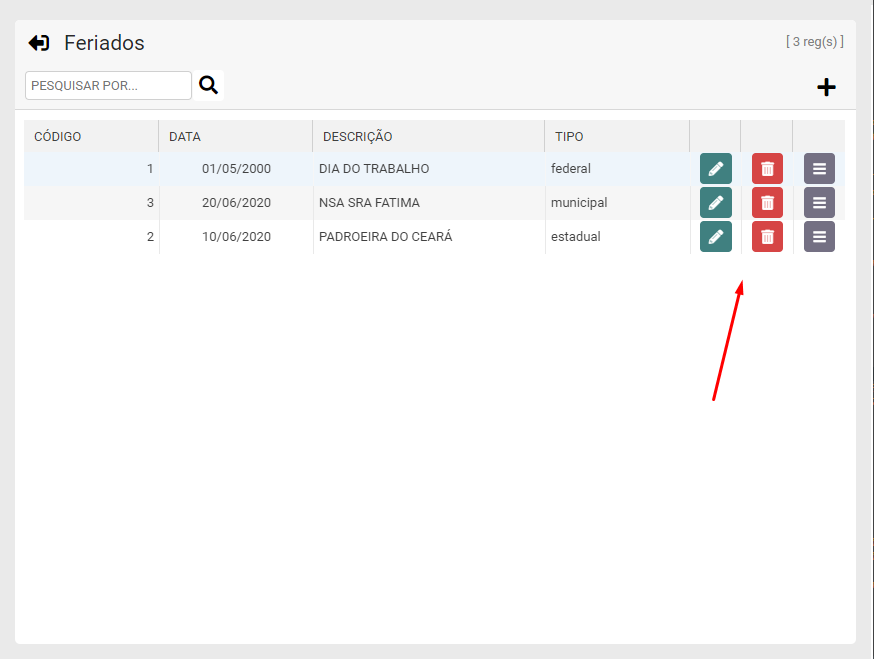
[[grid-btn: edo]] - Creates the standard buttons: EDIT, DELETE and OPTIONS. The events are already configured to trigger the respective buttons
[[grid-btn:edit]] - Creates the default button: EDIT with the default settings.
[[grid-btn:delete]] - Creates the default button: DELETE with the default settings.
[[grid-btn:options]] - Creates the default button: OPTIONS with the default settings.
For more details, see the example on frmCadFERIADOS (on Create).
IMPORTANT:
When an action button is detected in the form inherited from "frmBaseCRUD", the CRUD model is also changed according to the image above.
The intention, in addition to demonstrating the feature, is to give you more options for you to apply to your projects.
Looking at the code it is possible to add more criticisms. These features are rendered in the rc_GridDrawCell function that is called in the OnDrawColumnCell event
of your uniDBGrid.
Created with the Personal Edition of HelpNDoc: Easily create PDF Help documents