"cls:" attribute
ATTRIBUTE "cls:"
UNIGUI already has properties for you to specify CSS classes in components as you can see below:
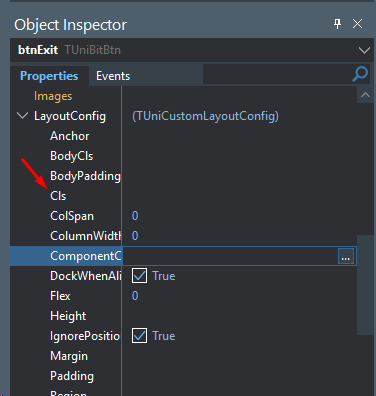
However, in RadCORE, the idea is to centralize everything with dynamic attributes, that is, in the "hint" property of each component.
The "cls:" attribute, to apply a CSS rule to a specific component, as well as dozens of other attributes for alignment, sizing, etc., can be used in a single location for easy maintenance.
There are many peculiarities in UNIGUI itself and, as we don't have detailed documentation, it is sometimes difficult to detect and apply certain features.
There are specific classes for buttons, labels, grids, etc.
In the RadCORE examples, always observe the "hint:" of the components to identify if a specific class is used.
One way to search is to search within "dfms" using GEXPERT for example.
So if you search all the files for "card-info-box" for example, you will find where this class was applied and understand its context.
Note:
You can use the standard way that unigui works. Using "cls:" simply makes it easier to use and maintain later.
Created with the Personal Edition of HelpNDoc: iPhone web sites made easy